
ApplePay
Apple Pay bestätigt einen PaymentIntent in einer einzigen Darstellung.
https://stripe.com/docs/apple-pay
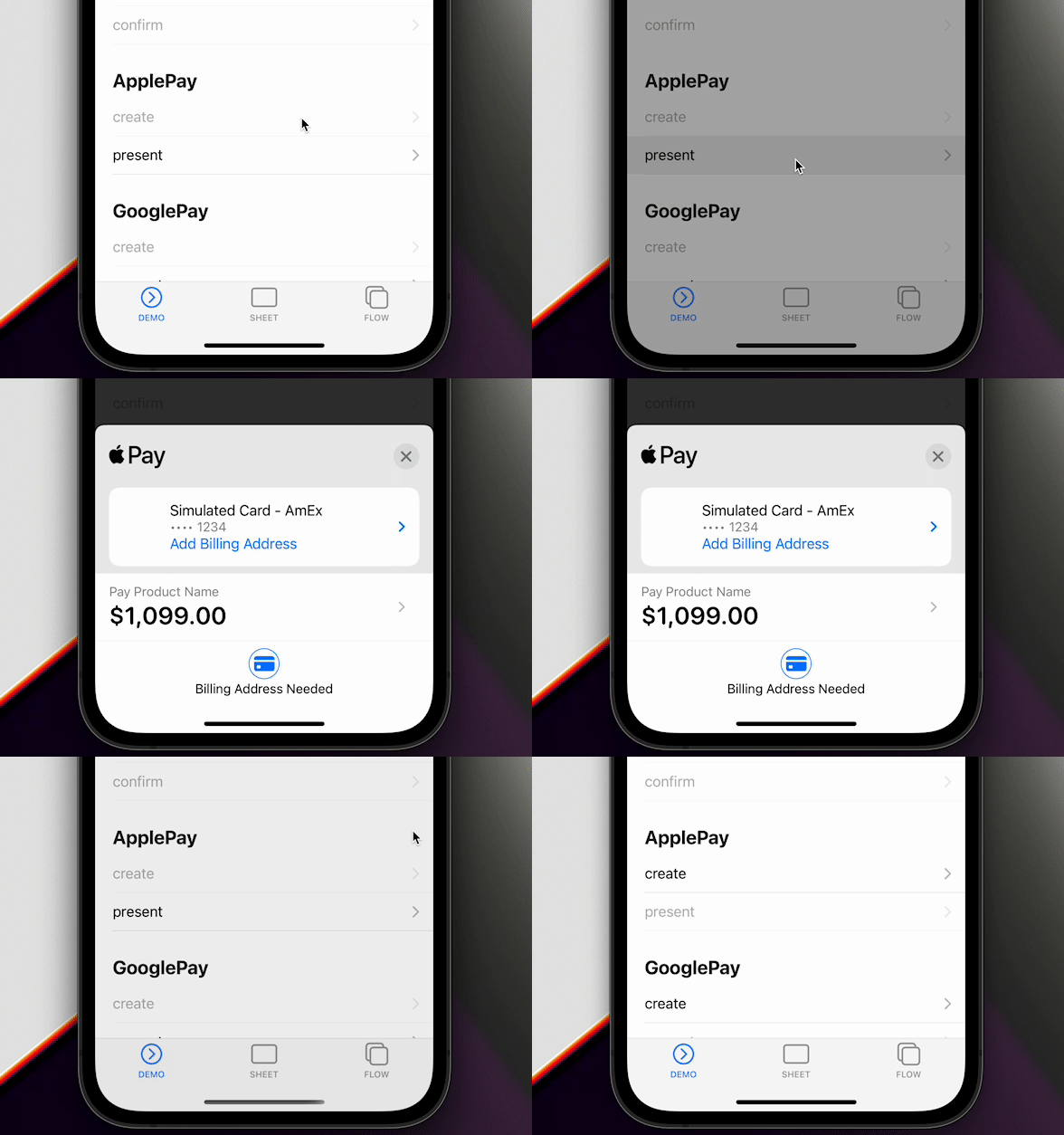
Plattformunterstützung
| Plattform | Apple Pay |
|---|---|
| iOS | Nativer STPApplePayContext |
| Android | Nicht implementiert |
| Web | Payment Request Button (stripe-pwa-elements) |
updateApplePaySheet und Aktualisierungen des Versandkontakts funktionieren nur unter iOS. Im Web löst updateApplePaySheet einen Fehler wegen fehlender Implementierung aus. Android weist isApplePayAvailable, createApplePay und presentApplePay zurück.
Einstellungen vorbereiten
- Eine Apple Merchant ID registrieren
- Ein Apple-Pay-Zertifikat erstellen
- Apple Pay in Xcode aktivieren
https://stripe.com/docs/apple-pay#merchantid
merchantIdentifier von createApplePay muss dieselbe Merchant ID sein, die im Apple-Developer-Konto und in Xcode registriert ist. Übergeben Sie hier nicht merchantDisplayName; diese Option gehört zu PaymentSheet und PaymentFlow.
1. isApplePayAvailable
Prüfen Sie das Gerät, bevor Sie eine Anfrage erstellen. Das Promise wird aufgelöst, wenn Apple Pay verfügbar ist, andernfalls zurückgewiesen.
import { ApplePayEventsEnum, Stripe } from '@capacitor-community/stripe';

try {
  await Stripe.isApplePayAvailable();
} catch {
  return;
}
method isApplePayAvailable()
Wird aufgelöst, wenn Apple Pay verfügbar ist, und andernfalls abgelehnt.
Apple Pay wird auf iOS und in kompatiblen Webbrowsern unterstützt, nicht auf Android.
isApplePayAvailable() => Promise<void>
2. createApplePay
Rufen Sie ein PaymentIntent-Client-Secret von Ihrem Backend ab. Ersetzen Sie /your-intent-endpoint im Beispiel durch die Backend-URL aus Serverintegration. Übergeben Sie anschließend paymentIntentClientSecret, paymentSummaryItems, merchantIdentifier, countryCode und currency.
// `/your-intent-endpoint` durch Ihr Backend aus der Anleitung zur Serverintegration ersetzen.
const response = await fetch('/your-intent-endpoint', {
  method: 'POST',
});
if (!response.ok) {
  throw new Error(`Intent request failed: ${response.status}`);
}
const { paymentIntent } = (await response.json()) as {
  paymentIntent: string;
};

await Stripe.createApplePay({
  paymentIntentClientSecret: paymentIntent,
  paymentSummaryItems: [{
    label: 'Product Name',
    amount: 1099.00
  }],
  merchantIdentifier: 'merchant.com.getcapacitor.stripe',
  countryCode: 'US',
  currency: 'USD',
});
method createApplePay(...)
Erstellt eine Apple-Pay-Anfrage. Vor presentApplePay() aufrufen.
createApplePay(options: CreateApplePayOption) => Promise<void>
interface CreateApplePayOption
| Eigenschaft | Typ | Beschreibung | Seit |
|---|---|---|---|
paymentIntentClientSecret |
string |
Client Secret des mit Apple Pay zu bestätigenden PaymentIntent. | 3.1.0 |
paymentSummaryItems |
PaymentSummaryItem[] |
Im Apple-Pay-Dialog angezeigte Positionen. | 3.1.0 |
merchantIdentifier |
string |
Für die App konfigurierte Apple-Händlerkennung. | 3.1.0 |
countryCode |
string |
Zweibuchstabiger ISO-3166-1-Ländercode für die Zahlungsanfrage. | 3.1.0 |
currency |
string |
Dreibuchstabiger ISO-4217-Währungscode für die Zahlungsanfrage. | 3.1.0 |
requiredShippingContactFields |
('postalAddress' | 'phoneNumber' | 'emailAddress' | 'name')[] |
Felder des Versandkontakts, die Apple Pay erfassen muss. Nur iOS. | 4.1.0 |
allowedCountries |
string[] |
Zweibuchstabige Ländercodes, für die Versand möglich ist. Nur iOS. | 5.4.3 |
allowedCountriesErrorDescription |
string |
Meldung, wenn das gewählte Versandland nicht erlaubt ist. Nur iOS. | 5.4.3 |
requiredShippingContactFields fordert Apple Pay zur Abfrage von Postanschrift, Telefonnummer, E-Mail-Adresse oder Namen auf. allowedCountries weist Versandländer zurück, die nicht in der Liste stehen.
3. presentApplePay
const result = await Stripe.presentApplePay();
if (result.paymentResult === ApplePayEventsEnum.Completed) {
  // Nur die UI aktualisieren. Den Intent vor der Leistungserbringung per Webhook bestätigen.
}
method presentApplePay()
Zeigt die mit createApplePay() erstellte Apple-Pay-Anfrage an.
presentApplePay() => Promise<{ paymentResult: ApplePayResultInterface; }>
type alias ApplePayResultInterface
ApplePayEventsEnum.Completed | ApplePayEventsEnum.Canceled | ApplePayEventsEnum.Failed | ApplePayEventsEnum.DidSelectShippingContact | ApplePayEventsEnum.DidCreatePaymentMethod
Behandeln Sie Canceled als Abbruch und Failed als Fehler.
4. addListener
Registrieren Sie Listener beim Anwendungsstart. Siehe Ereignis-Listener.
Stripe.addListener(ApplePayEventsEnum.Completed, () => {
  console.log('ApplePayEventsEnum.Completed');
});
enum ApplePayEventsEnum
| Mitglied | Wert |
|---|---|
Loaded |
'applePayLoaded' |
FailedToLoad |
'applePayFailedToLoad' |
Completed |
'applePayCompleted' |
Canceled |
'applePayCanceled' |
Failed |
'applePayFailed' |
DidSelectShippingContact |
'applePayDidSelectShippingContact' |
DidCreatePaymentMethod |
'applePayDidCreatePaymentMethod' |
5. updateApplePaySheet
Unter iOS enthält DidSelectShippingContact contact und updateId. Berechnen Sie Gesamtbeträge neu und rufen Sie updateApplePaySheet mit dieser updateId auf. Antwortet JavaScript nicht, greift das native Sheet nach 25 Sekunden auf die ursprünglichen Zusammenfassungspositionen zurück.
Stripe.addListener(ApplePayEventsEnum.DidSelectShippingContact, async (data) => {
  await Stripe.updateApplePaySheet({
    updateId: data.updateId,
    paymentSummaryItems: [
      { label: 'Product Name', amount: 1099.00 },
      { label: 'Shipping', amount: 500.00 },
      { label: 'Total', amount: 1599.00 },
    ],
  });
});
method updateApplePaySheet(...)
Aktualisiert nach einem Versandkontakt-Callback den nativen Apple-Pay-Dialog.
Nur iOS; im Web wird diese Methode nicht unterstützt.
updateApplePaySheet(options: UpdateApplePaySheetOption) => Promise<void>
interface DidSelectShippingContact
Apple-Pay-Daten des Versandkontakts.
| Eigenschaft | Typ | Beschreibung | Seit |
|---|---|---|---|
contact |
ShippingContact |
In Apple Pay ausgewählter Versandkontakt. | 4.1.0 |
updateId |
string |
Für diesen Callback an updateApplePaySheet() übergebene Kennung. |
4.1.0 |
interface PaymentSummaryItem
| Eigenschaft | Typ | Beschreibung | Seit |
|---|---|---|---|
label |
string |
Im Apple-Pay-Dialog angezeigte Bezeichnung der Position. | 3.1.0 |
amount |
number |
Dezimalbetrag in der Haupteinheit der Währung, beispielsweise 10.99. |
3.1.0 |
DidCreatePaymentMethod enthält den Versandkontakt, nachdem Apple die Zahlungsmethode erstellt hat. Apple gibt die vollständige Adresse erst nach einer erfolgreichen Zahlung zurück.
interface DidCreatePaymentMethod
| Eigenschaft | Typ | Beschreibung | Seit |
|---|---|---|---|
contact |
ShippingContact |
Der Apple-Pay-Zahlungsmethode zugeordneter Kontakt. | 4.1.0 |
interface ShippingContact
| Eigenschaft | Typ | Beschreibung | Seit |
|---|---|---|---|
givenName |
string |
Vorname des Kontakts. Nur Apple Pay. | 4.1.0 |
familyName |
string |
Nachname des Kontakts. Nur Apple Pay. | 4.1.0 |
middleName |
string |
Zweiter Vorname des Kontakts. Nur Apple Pay. | 4.1.0 |
namePrefix |
string |
Namenspräfix des Kontakts. Nur Apple Pay. | 4.1.0 |
nameSuffix |
string |
Namenssuffix des Kontakts. Nur Apple Pay. | 4.1.0 |
nameFormatted |
string |
Formatierter vollständiger Name des Kontakts. Nur Apple Pay. | 4.1.0 |
phoneNumber |
string |
Telefonnummer des Kontakts. Nur Apple Pay. | 4.1.0 |
nickname |
string |
Spitzname des Kontakts. Nur Apple Pay. | 4.1.0 |
street |
string |
Straßenbestandteil der Postadresse des Kontakts. Nur Apple Pay. | 4.1.0 |
city |
string |
Ortsbestandteil der Postadresse des Kontakts. Nur Apple Pay. | 4.1.0 |
state |
string |
Bundesland- oder Provinzbestandteil der Postadresse des Kontakts. Nur Apple Pay. | 4.1.0 |
postalCode |
string |
Postleitzahlbestandteil der Adresse des Kontakts. Nur Apple Pay. | 4.1.0 |
country |
string |
Länder- oder Regionsname in der Adresse des Kontakts. Nur Apple Pay. | 4.1.0 |
isoCountryCode |
string |
ISO-Ländercode in der Adresse des Kontakts. Nur Apple Pay. | 4.1.0 |
subAdministrativeArea |
string |
Untergeordneter Verwaltungsbereich in der Adresse des Kontakts. Nur Apple Pay. | 4.1.0 |
subLocality |
string |
Untergeordneter Ortsbereich in der Adresse des Kontakts. Nur Apple Pay. | 4.1.0 |
Referenz
import { ApplePayEventsEnum, Stripe } from '@capacitor-community/stripe';

(async () => {
  try {
    await Stripe.isApplePayAvailable();
  } catch {
    return;
  }

  await Stripe.addListener(ApplePayEventsEnum.Completed, () => {
    console.log('ApplePayEventsEnum.Completed');
  });

  // Replace `/your-intent-endpoint` with your backend from Server Integration.
  const response = await fetch('/your-intent-endpoint', {
    method: 'POST',
  });
  if (!response.ok) {
    throw new Error(`Intent request failed: ${response.status}`);
  }
  const { paymentIntent } = (await response.json()) as {
    paymentIntent: string;
  };

  // Prepare Apple Pay
  await Stripe.createApplePay({
    paymentIntentClientSecret: paymentIntent,
    paymentSummaryItems: [{
      label: 'Product Name',
      amount: 1099.00
    }],
    merchantIdentifier: 'merchant.com.getcapacitor.stripe',
    countryCode: 'US',
    currency: 'USD',
  });

  // Present Apple Pay
  const result = await Stripe.presentApplePay();
  if (result.paymentResult === ApplePayEventsEnum.Completed) {
    // Update UI only. Fulfill orders from a verified server webhook.
  }
})();