
Apple Pay
Apple Pay は一度の表示で PaymentIntent を確定します。
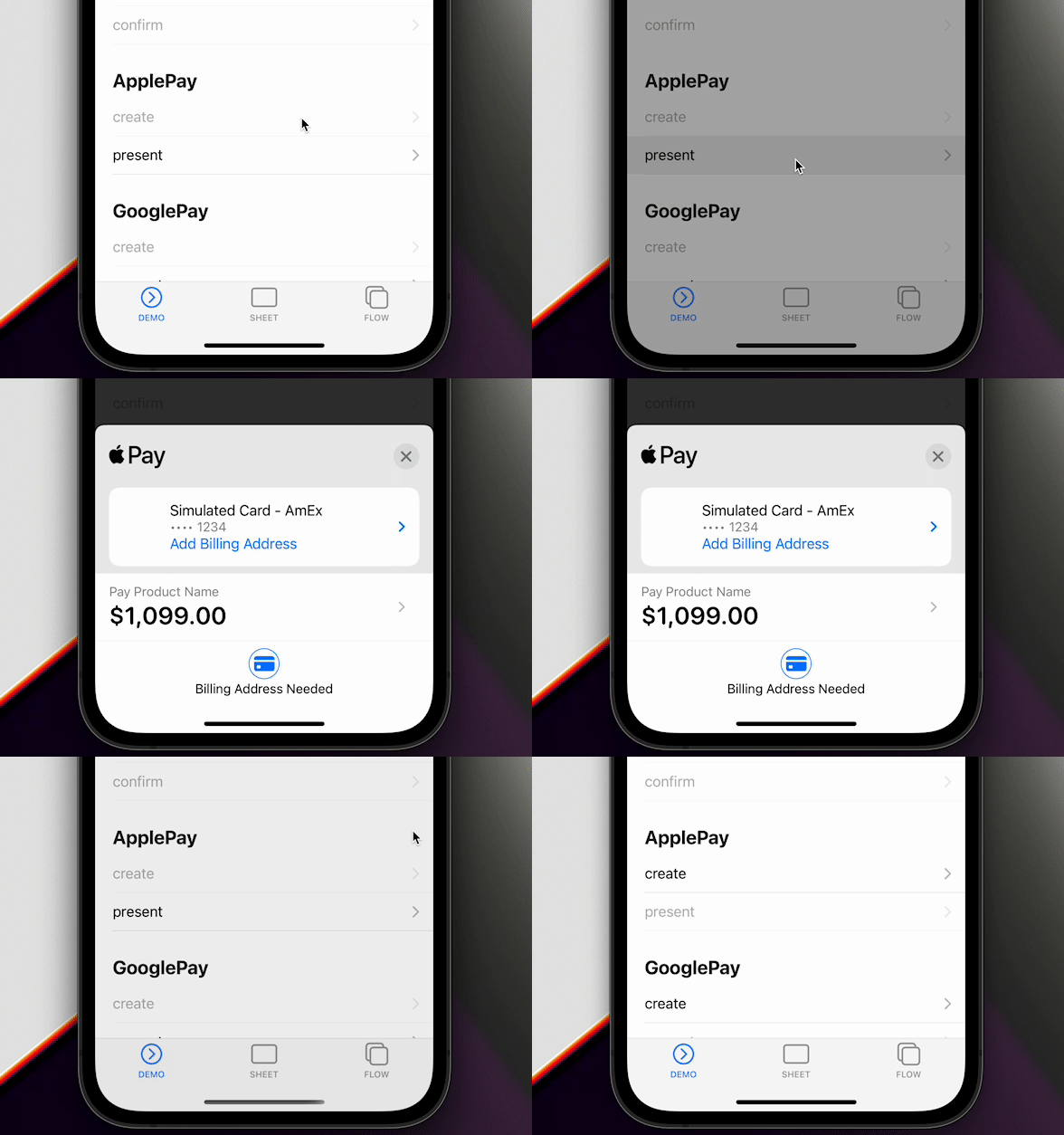
プラットフォーム対応
| プラットフォーム | Apple Pay |
|---|---|
| iOS | ネイティブ STPApplePayContext |
| Android | 未実装 |
| Web | Payment Request Button(stripe-pwa-elements) |
updateApplePaySheet と配送先の更新は iOS 専用です。Web の updateApplePaySheet は未実装エラーとなり、Android の isApplePayAvailable、createApplePay、presentApplePay は拒否されます。
事前設定
- Apple Merchant ID を登録する
- Apple Pay 証明書を作成する
- Xcode で Apple Pay を有効にする
Stripe の Merchant ID 設定を参照してください。
createApplePay の merchantIdentifier には、Apple Developer アカウントと Xcode に登録したものと同じ Merchant ID を指定します。merchantDisplayName は PaymentSheet と PaymentFlow のオプションであり、ここでは渡しません。
1. isApplePayAvailable
リクエスト作成前に端末を確認します。Apple Pay が利用可能なら Promise が解決し、それ以外は拒否されます。
try { await Stripe.isApplePayAvailable(); } catch { return; }
method isApplePayAvailable()
Resolves when Apple Pay is available and rejects when it is unavailable.
Apple Pay is supported on iOS and compatible web browsers, not Android.
isApplePayAvailable() => Promise<void>
2. createApplePay
バックエンドから PaymentIntent のクライアントシークレットを取得し、paymentIntentClientSecret、paymentSummaryItems、merchantIdentifier、countryCode、currency を渡します。
await Stripe.createApplePay({
  paymentIntentClientSecret: paymentIntent,
  paymentSummaryItems: [{ label: 'Product Name', amount: 1099.00 }],
  merchantIdentifier: 'merchant.com.getcapacitor.stripe',
  countryCode: 'US',
  currency: 'USD',
});
method createApplePay(...)
Creates an Apple Pay request. Call this before presentApplePay().
createApplePay(options: CreateApplePayOption) => Promise<void>
interface CreateApplePayOption
| Prop | Type | Description | Since |
|---|---|---|---|
paymentIntentClientSecret |
string |
Client secret of the PaymentIntent to confirm with Apple Pay. | 3.1.0 |
paymentSummaryItems |
PaymentSummaryItem[] |
Line items displayed in the Apple Pay sheet. | 3.1.0 |
merchantIdentifier |
string |
Apple merchant identifier configured for the app. | 3.1.0 |
countryCode |
string |
Two-letter ISO 3166-1 country code for the payment request. | 3.1.0 |
currency |
string |
Three-letter ISO 4217 currency code for the payment request. | 3.1.0 |
requiredShippingContactFields |
('postalAddress' | 'phoneNumber' | 'emailAddress' | 'name')[] |
Shipping contact fields Apple Pay must collect. iOS only. | 4.1.0 |
allowedCountries |
string[] |
Two-letter country codes accepted for shipping. iOS only. | 5.4.3 |
allowedCountriesErrorDescription |
string |
Message shown when the selected shipping country is not allowed. iOS only. | 5.4.3 |
requiredShippingContactFields は住所、電話、メール、氏名を Apple Pay に要求します。allowedCountries に含まれない配送先の国は拒否されます。
3. presentApplePay
const result = await Stripe.presentApplePay();
if (result.paymentResult === ApplePayEventsEnum.Completed) {
  // UIだけを更新し、WebhookでIntentを確認します。
}
method presentApplePay()
Presents the Apple Pay request created by createApplePay().
presentApplePay() => Promise<{ paymentResult: ApplePayResultInterface; }>
type alias ApplePayResultInterface
ApplePayEventsEnum.Completed | ApplePayEventsEnum.Canceled | ApplePayEventsEnum.Failed | ApplePayEventsEnum.DidSelectShippingContact | ApplePayEventsEnum.DidCreatePaymentMethod
Canceled はキャンセル、Failed はエラーとして扱います。
4. addListener
リスナーはアプリケーション起動時に登録します。イベントリスナーを参照してください。
Stripe.addListener(ApplePayEventsEnum.Completed, () => console.log('Completed'));
enum ApplePayEventsEnum
| Member | Value |
|---|---|
Loaded |
'applePayLoaded' |
FailedToLoad |
'applePayFailedToLoad' |
Completed |
'applePayCompleted' |
Canceled |
'applePayCanceled' |
Failed |
'applePayFailed' |
DidSelectShippingContact |
'applePayDidSelectShippingContact' |
DidCreatePaymentMethod |
'applePayDidCreatePaymentMethod' |
5. updateApplePaySheet
iOS の DidSelectShippingContact には contact と updateId が含まれます。合計を再計算し、その updateId で updateApplePaySheet を呼びます。JavaScript が応答しない場合、ネイティブシートは25秒後に元の明細へ戻ります。
Stripe.addListener(ApplePayEventsEnum.DidSelectShippingContact, async (data) => {
  await Stripe.updateApplePaySheet({
    updateId: data.updateId,
    paymentSummaryItems: [
      { label: 'Product Name', amount: 1099.00 },
      { label: 'Shipping', amount: 500.00 },
      { label: 'Total', amount: 1599.00 },
    ],
  });
});
method updateApplePaySheet(...)
Updates the native Apple Pay sheet after a shipping-contact callback.
iOS only; this method is not supported on web.
updateApplePaySheet(options: UpdateApplePaySheetOption) => Promise<void>
interface DidSelectShippingContact
Apple Pay shipping-contact data.
| Prop | Type | Description | Since |
|---|---|---|---|
contact |
ShippingContact |
Shipping contact selected in Apple Pay. | 4.1.0 |
updateId |
string |
Identifier passed to updateApplePaySheet() for this callback. |
4.1.0 |
interface PaymentSummaryItem
| Prop | Type | Description | Since |
|---|---|---|---|
label |
string |
Label shown for the line item in the Apple Pay sheet. | 3.1.0 |
amount |
number |
Decimal amount in the currency's major unit, for example 10.99. |
3.1.0 |
DidCreatePaymentMethod には Apple が支払い方法を作成した後の配送先が含まれます。Apple は支払い成功まで住所全体を返しません。
interface DidCreatePaymentMethod
| Prop | Type | Description | Since |
|---|---|---|---|
contact |
ShippingContact |
Contact attached to the Apple Pay payment method. | 4.1.0 |
interface ShippingContact
| Prop | Type | Description | Since |
|---|---|---|---|
givenName |
string |
Contact's given name. Apple Pay only. | 4.1.0 |
familyName |
string |
Contact's family name. Apple Pay only. | 4.1.0 |
middleName |
string |
Contact's middle name. Apple Pay only. | 4.1.0 |
namePrefix |
string |
Contact's name prefix. Apple Pay only. | 4.1.0 |
nameSuffix |
string |
Contact's name suffix. Apple Pay only. | 4.1.0 |
nameFormatted |
string |
Contact's formatted full name. Apple Pay only. | 4.1.0 |
phoneNumber |
string |
Contact's phone number. Apple Pay only. | 4.1.0 |
nickname |
string |
Contact's nickname. Apple Pay only. | 4.1.0 |
street |
string |
Street component of the contact's postal address. Apple Pay only. | 4.1.0 |
city |
string |
City component of the contact's postal address. Apple Pay only. | 4.1.0 |
state |
string |
State or province component of the contact's postal address. Apple Pay only. | 4.1.0 |
postalCode |
string |
Postal-code component of the contact's address. Apple Pay only. | 4.1.0 |
country |
string |
Country or region name in the contact's address. Apple Pay only. | 4.1.0 |
isoCountryCode |
string |
ISO country code in the contact's address. Apple Pay only. | 4.1.0 |
subAdministrativeArea |
string |
Sub-administrative area in the contact's address. Apple Pay only. | 4.1.0 |
subLocality |
string |
Sublocality in the contact's address. Apple Pay only. | 4.1.0 |
参考資料
import { firstValueFrom } from 'rxjs';
import { ApplePayEventsEnum, Stripe } from '@capacitor-community/stripe';

(async () => {
  try {
    await Stripe.isApplePayAvailable();
  } catch {
    return;
  }

  Stripe.addListener(ApplePayEventsEnum.Completed, () => {
    console.log('ApplePayEventsEnum.Completed');
  });

  // Connect to your backend endpoint, and get paymentIntent.
  const { paymentIntent } = await firstValueFrom(this.http.post<{
    paymentIntent: string;
  }>(environment.api + 'intent', {}));

  // Prepare Apple Pay
  await Stripe.createApplePay({
    paymentIntentClientSecret: paymentIntent,
    paymentSummaryItems: [{
      label: 'Product Name',
      amount: 1099.00
    }],
    merchantIdentifier: 'merchant.com.getcapacitor.stripe',
    countryCode: 'US',
    currency: 'USD',
  });

  // Present Apple Pay
  const result = await Stripe.presentApplePay();
  if (result.paymentResult === ApplePayEventsEnum.Completed) {
    // Happy path
  }
})();