
PaymentFlow
PaymentFlow は支払い方法の収集と確定を分離します。presentPaymentFlow で支払い方法を収集してカードを保留状態にし、通常は確認画面を挟んでから confirmPaymentFlow で Intent を確定します。
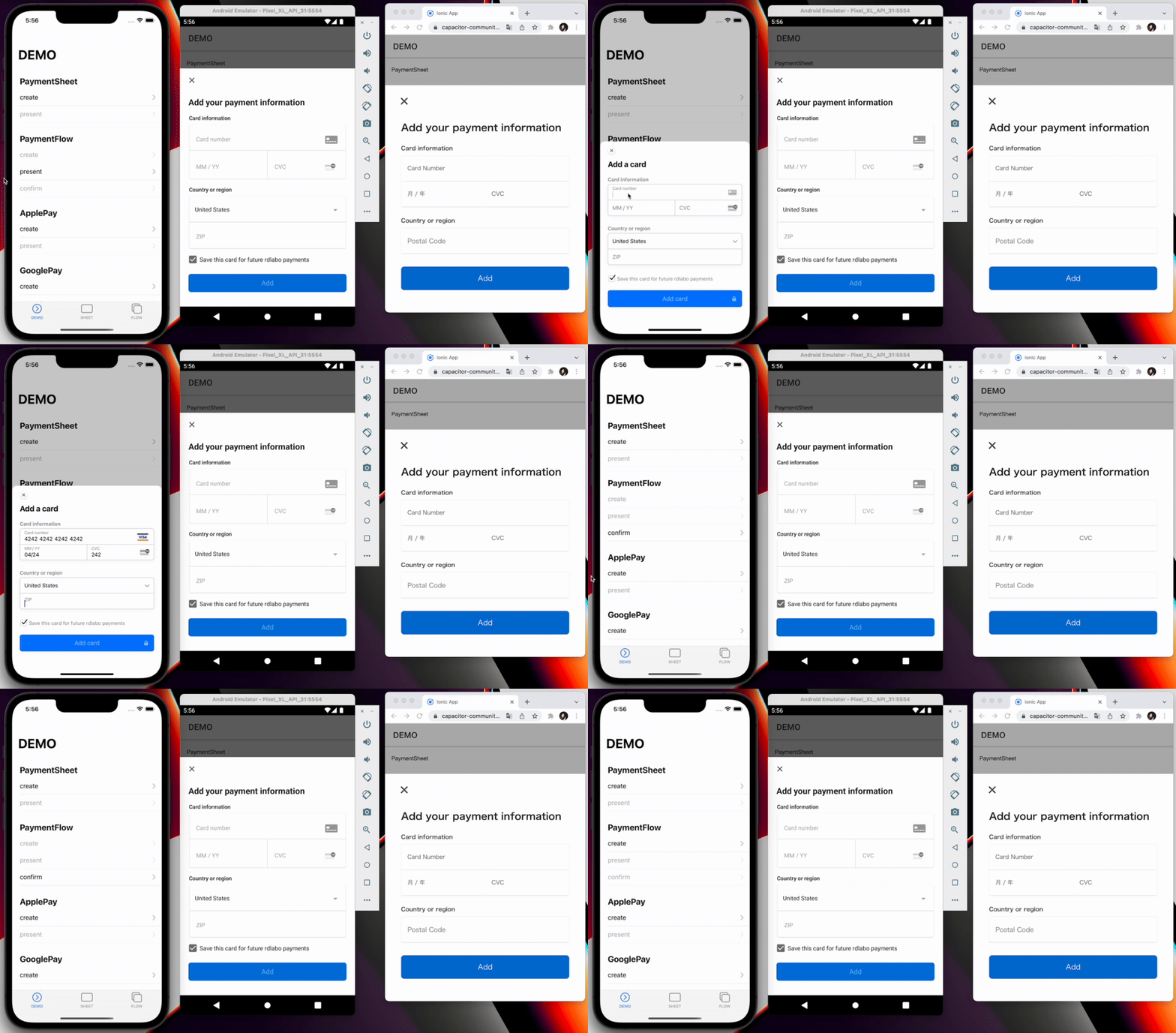
PaymentIntent または SetupIntent をサーバーで作成します。サーバー連携を参照してください。
プラットフォーム対応
| プラットフォーム | PaymentFlow |
|---|---|
| iOS | ネイティブ PaymentSheet.FlowController |
| Android | ネイティブ PaymentSheet.FlowController |
| Web | stripe-pwa-elements のカードモーダル |
Web は paymentIntentClientSecret または setupIntentClientSecret と、任意の withZipCode に対応します。請求先情報、ウォレット、style、returnURL などのネイティブ専用オプションは Web では無視されます。
1. createPaymentFlow
バックエンドからクライアントへ安全に渡せるシークレットを取得し、paymentIntentClientSecret と setupIntentClientSecret のどちらか一方を渡します。customerId を設定する場合は customerEphemeralKeySecret も必要です。
await Stripe.createPaymentFlow({
  paymentIntentClientSecret: paymentIntent,
  customerEphemeralKeySecret: ephemeralKey,
  customerId: customer,
  merchantDisplayName: 'rdlabo',
});
method createPaymentFlow(...)
Creates a PaymentFlow instance. Use PaymentFlow when the app must collect
payment details first and confirm them in a later step.
createPaymentFlow(options: CreatePaymentFlowOption) => Promise<void>
interface CreatePaymentFlowOption
| Prop | Type | Description | Default | Since |
|---|---|---|---|---|
paymentIntentClientSecret |
string |
Client secret of the PaymentIntent to confirm. Provide exactly one of paymentIntentClientSecret or setupIntentClientSecret. |
3.0.2 | |
setupIntentClientSecret |
string |
Client secret of the SetupIntent used to save a payment method. Provide exactly one of paymentIntentClientSecret or setupIntentClientSecret. |
3.0.2 | |
defaultBillingDetails |
DefaultBillingDetails |
Billing details used to prefill PaymentSheet. iOS and Android only. https://docs.stripe.com/payments/mobile/collect-addresses?payment-ui=mobile&platform=ios#set-default-billing-details | 7.2.0 | |
shippingDetails |
AddressDetails |
Shipping details used to prefill PaymentSheet. Android only; on iOS use Stripe's address element instead. https://docs.stripe.com/payments/mobile/collect-addresses?payment-ui=mobile&platform=android#prefill-addresses | 7.2.0 | |
billingDetailsCollectionConfiguration |
BillingDetailsCollectionConfiguration |
Controls which billing details PaymentSheet collects. iOS and Android only. https://docs.stripe.com/payments/mobile/collect-addresses?payment-ui=mobile&platform=ios#customize-billing-details-collection | 7.2.0 | |
customerEphemeralKeySecret |
string |
Customer ephemeral-key secret returned by your server. Use together with customerId; do not provide only one of the pair. |
3.0.0 | |
customerId |
string |
Stripe Customer ID associated with customerEphemeralKeySecret. |
3.0.0 | |
enableApplePay |
boolean |
Enables Apple Pay in native PaymentSheet. iOS only. | false | 3.3.0 |
applePayMerchantId |
string |
Apple merchant identifier configured for the app. Required when enableApplePay is true and ignored otherwise. |
3.3.0 | |
enableGooglePay |
boolean |
Enables Google Pay in native PaymentSheet. Android only. | false | 3.2.0 |
GooglePayIsTesting |
boolean |
Uses the Google Pay test environment. Android only. | false | 3.2.0 |
countryCode |
string |
Two-letter ISO 3166-1 country code used by Apple Pay or Google Pay. Ignored when neither wallet is enabled. | "US" | 3.2.0 |
merchantDisplayName |
string |
Merchant name displayed in native PaymentSheet. | "App Name" | 3.0.0 |
returnURL |
string |
Custom URL scheme used to return to the app after redirect-based authentication. iOS only. | "" | 3.0.0 |
paymentMethodLayout |
'automatic' | 'horizontal' | 'vertical' |
Layout used to display payment methods in PaymentSheet on iOS and Android. | "automatic" | 7.2.2 |
style |
'alwaysLight' | 'alwaysDark' |
Appearance override for native PaymentSheet. iOS only. | undefined | 3.0.0 |
withZipCode |
boolean |
Shows the ZIP-code field in the web card form. Web only. | true | 3.6.0 |
currencyCode |
string |
Three-letter ISO 4217 currency code used by Google Pay. Required when Google Pay is enabled for a SetupIntent. | "USD" | 7.1.0 |
2. presentPaymentFlow
createPaymentFlow が成功した後だけ呼び出します。返される cardNumber はマスク済みで、この時点では Intent は未確定です。
const result = await Stripe.presentPaymentFlow();
console.log(result); // { cardNumber: "●●●● ●●●● ●●●● ****" }
method presentPaymentFlow()
Presents the PaymentFlow created by createPaymentFlow() and resolves
with the last four digits of the selected card.
presentPaymentFlow() => Promise<{ cardNumber: string; }>
利用者がキャンセルすると Promise が拒否されるか Canceled が発生します。Created または成功結果を受け取るまで confirmPaymentFlow を呼ばないでください。
3. confirmPaymentFlow
const result = await Stripe.confirmPaymentFlow();
if (result.paymentResult === PaymentFlowEventsEnum.Completed) {
  // UIだけを更新し、WebhookでIntentを確認します。
}
method confirmPaymentFlow()
Confirms the payment details collected by presentPaymentFlow().
confirmPaymentFlow() => Promise<{ paymentResult: PaymentFlowResultInterface; }>
type alias PaymentFlowResultInterface
PaymentFlowEventsEnum.Completed | PaymentFlowEventsEnum.Canceled | PaymentFlowEventsEnum.Failed
Canceled はキャンセル、Failed はエラーです。クライアント結果だけでは注文を確定できません。
4. addListener
結果リスナーは起動時に一度だけ登録します。Android Activity の再生成後は Created を含め、Promise よりイベントを優先してください。イベントリスナーを参照してください。
await Promise.all([
  Stripe.addListener(PaymentFlowEventsEnum.Created, (info) => console.log(info.cardNumber)),
  Stripe.addListener(PaymentFlowEventsEnum.Completed, () => console.log('Completed')),
  Stripe.addListener(PaymentFlowEventsEnum.Canceled, () => console.log('Canceled')),
  Stripe.addListener(PaymentFlowEventsEnum.Failed, (error) => console.log(error)),
]);
enum PaymentFlowEventsEnum
| Member | Value |
|---|---|
Loaded |
'paymentFlowLoaded' |
FailedToLoad |
'paymentFlowFailedToLoad' |
Opened |
'paymentFlowOpened' |
Created |
'paymentFlowCreated' |
Completed |
'paymentFlowCompleted' |
Canceled |
'paymentFlowCanceled' |
Failed |
'paymentFlowFailed' |
参考資料
import { firstValueFrom } from 'rxjs';
import { PaymentFlowEventsEnum, Stripe } from '@capacitor-community/stripe';

(async () => {
  Stripe.addListener(PaymentFlowEventsEnum.Completed, () => {
    console.log('PaymentFlowEventsEnum.Completed');
  });

  // Connect to your backend endpoint, and get every key.
  const { paymentIntent, ephemeralKey, customer } = await firstValueFrom(this.http.post<{
    paymentIntent: string;
    ephemeralKey: string;
    customer: string;
  }>(environment.api + 'intent', {}));

  // Prepare PaymentFlow with CreatePaymentFlowOption.
  await Stripe.createPaymentFlow({
    paymentIntentClientSecret: paymentIntent,
    // setupIntentClientSecret: setupIntent,
    customerEphemeralKeySecret: ephemeralKey,
    customerId: customer,
  });

  // Collect payment details. The Intent is not confirmed yet.
  const presentResult = await Stripe.presentPaymentFlow();
  console.log(presentResult); // { cardNumber: "●●●● ●●●● ●●●● ****" }

  // Confirm PaymentFlow. Completed.
  const confirmResult = await Stripe.confirmPaymentFlow();
  if (confirmResult.paymentResult === PaymentFlowEventsEnum.Completed) {
    // Happy path
  }
})();