
PaymentFlow
PaymentFlow splits collection and confirmation. presentPaymentFlow collects the payment method and returns a pending card. confirmPaymentFlow confirms the Intent later, usually after a review screen.
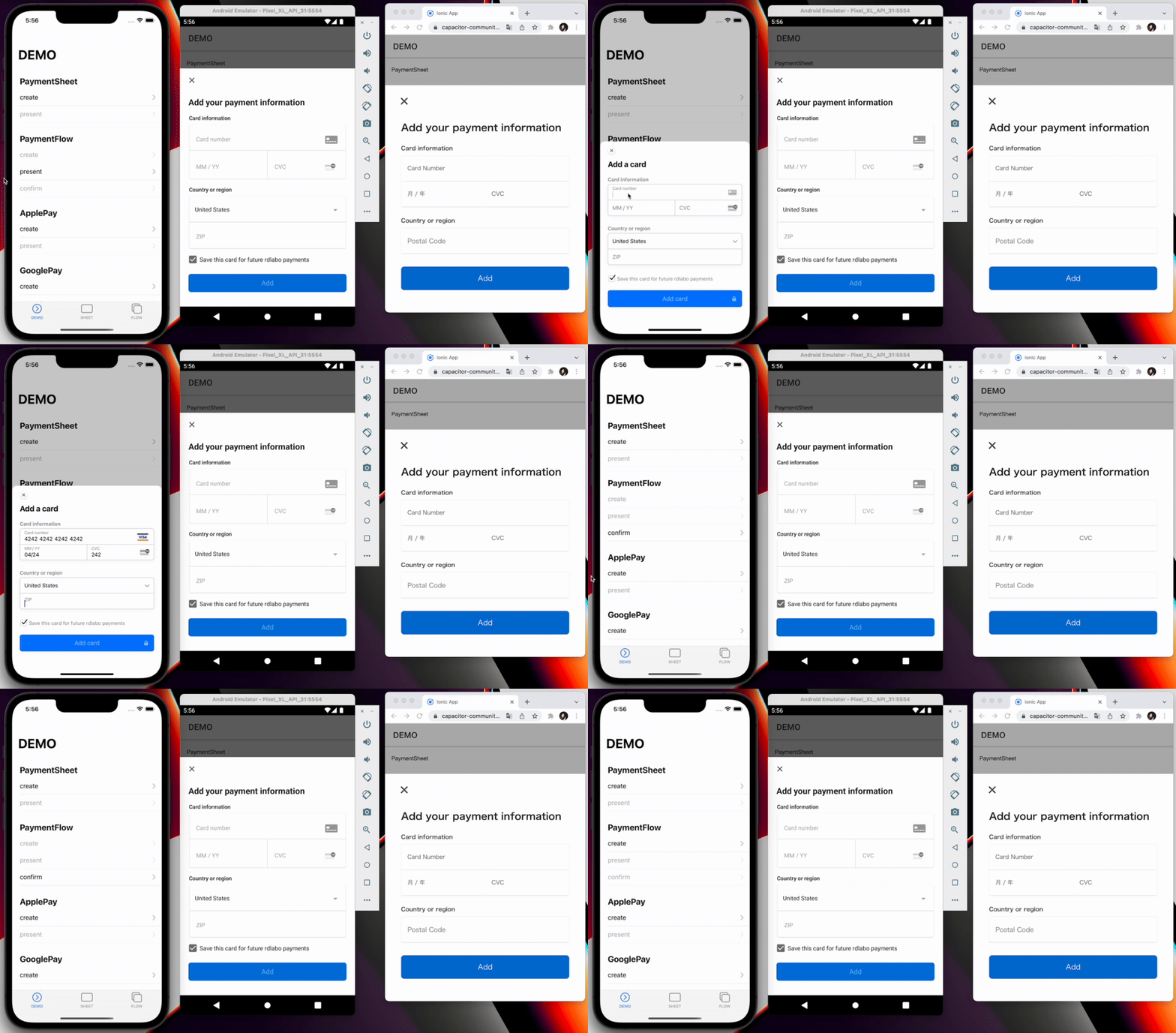
Use a PaymentIntent or a SetupIntent. Create those objects on your server. See Server Integration.
Platform support
| Platform | PaymentFlow |
|---|---|
| iOS | Native PaymentSheet.FlowController |
| Android | Native PaymentSheet.FlowController |
| Web | stripe-pwa-elements card modal |
Web supports paymentIntentClientSecret or setupIntentClientSecret, plus optional withZipCode. Native-only options such as defaultBillingDetails, shippingDetails, billingDetailsCollectionConfiguration, enableApplePay, enableGooglePay, style, and returnURL are ignored on web.
1. createPaymentFlow
Fetch client-safe secrets from your backend, then call createPaymentFlow. Provide either paymentIntentClientSecret or setupIntentClientSecret. customerId and customerEphemeralKeySecret are optional together. If you set customerId, you must also set customerEphemeralKeySecret.
import { firstValueFrom } from 'rxjs';
import { PaymentFlowEventsEnum, Stripe } from '@capacitor-community/stripe';

const { paymentIntent, ephemeralKey, customer } = await firstValueFrom(
  this.http.post<{
    paymentIntent: string;
    ephemeralKey: string;
    customer: string;
  }>(environment.api + 'intent', {}),
);

await Stripe.createPaymentFlow({
  paymentIntentClientSecret: paymentIntent,
  customerEphemeralKeySecret: ephemeralKey,
  customerId: customer,
  merchantDisplayName: 'rdlabo',
});
method createPaymentFlow(...)
Creates a PaymentFlow instance. Use PaymentFlow when the app must collect
payment details first and confirm them in a later step.
createPaymentFlow(options: CreatePaymentFlowOption) => Promise<void>
interface CreatePaymentFlowOption
| Prop | Type | Description | Default | Since |
|---|---|---|---|---|
paymentIntentClientSecret |
string |
Client secret of the PaymentIntent to confirm. Provide exactly one of paymentIntentClientSecret or setupIntentClientSecret. |
3.0.2 | |
setupIntentClientSecret |
string |
Client secret of the SetupIntent used to save a payment method. Provide exactly one of paymentIntentClientSecret or setupIntentClientSecret. |
3.0.2 | |
defaultBillingDetails |
DefaultBillingDetails |
Billing details used to prefill PaymentSheet. iOS and Android only. https://docs.stripe.com/payments/mobile/collect-addresses?payment-ui=mobile&platform=ios#set-default-billing-details | 7.2.0 | |
shippingDetails |
AddressDetails |
Shipping details used to prefill PaymentSheet. Android only; on iOS use Stripe's address element instead. https://docs.stripe.com/payments/mobile/collect-addresses?payment-ui=mobile&platform=android#prefill-addresses | 7.2.0 | |
billingDetailsCollectionConfiguration |
BillingDetailsCollectionConfiguration |
Controls which billing details PaymentSheet collects. iOS and Android only. https://docs.stripe.com/payments/mobile/collect-addresses?payment-ui=mobile&platform=ios#customize-billing-details-collection | 7.2.0 | |
customerEphemeralKeySecret |
string |
Customer ephemeral-key secret returned by your server. Use together with customerId; do not provide only one of the pair. |
3.0.0 | |
customerId |
string |
Stripe Customer ID associated with customerEphemeralKeySecret. |
3.0.0 | |
enableApplePay |
boolean |
Enables Apple Pay in native PaymentSheet. iOS only. | false | 3.3.0 |
applePayMerchantId |
string |
Apple merchant identifier configured for the app. Required when enableApplePay is true and ignored otherwise. |
3.3.0 | |
enableGooglePay |
boolean |
Enables Google Pay in native PaymentSheet. Android only. | false | 3.2.0 |
GooglePayIsTesting |
boolean |
Uses the Google Pay test environment. Android only. | false | 3.2.0 |
countryCode |
string |
Two-letter ISO 3166-1 country code used by Apple Pay or Google Pay. Ignored when neither wallet is enabled. | "US" | 3.2.0 |
merchantDisplayName |
string |
Merchant name displayed in native PaymentSheet. | "App Name" | 3.0.0 |
returnURL |
string |
Custom URL scheme used to return to the app after redirect-based authentication. iOS only. | "" | 3.0.0 |
paymentMethodLayout |
'automatic' | 'horizontal' | 'vertical' |
Layout used to display payment methods in PaymentSheet on iOS and Android. | "automatic" | 7.2.2 |
style |
'alwaysLight' | 'alwaysDark' |
Appearance override for native PaymentSheet. iOS only. | undefined | 3.0.0 |
withZipCode |
boolean |
Shows the ZIP-code field in the web card form. Web only. | true | 3.6.0 |
currencyCode |
string |
Three-letter ISO 4217 currency code used by Google Pay. Required when Google Pay is enabled for a SetupIntent. | "USD" | 7.1.0 |
2. presentPaymentFlow
Call presentPaymentFlow only after createPaymentFlow succeeds. The returned cardNumber is a masked value. The Intent is not confirmed yet.
const presentResult = await Stripe.presentPaymentFlow();
console.log(presentResult); // { cardNumber: "●●●● ●●●● ●●●● ****" }
method presentPaymentFlow()
Presents the PaymentFlow created by createPaymentFlow() and resolves
with the last four digits of the selected card.
presentPaymentFlow() => Promise<{ cardNumber: string; }>
If the customer cancels, the promise rejects or the Canceled event fires. Do not call confirmPaymentFlow until Created or a successful presentPaymentFlow result.
3. confirmPaymentFlow
const confirmResult = await Stripe.confirmPaymentFlow();
if (confirmResult.paymentResult === PaymentFlowEventsEnum.Completed) {
  // Update UI only. Confirm the Intent with a webhook before fulfilling.
}
method confirmPaymentFlow()
Confirms the payment details collected by presentPaymentFlow().
confirmPaymentFlow() => Promise<{ paymentResult: PaymentFlowResultInterface; }>
type alias PaymentFlowResultInterface
PaymentFlowEventsEnum.Completed | PaymentFlowEventsEnum.Canceled | PaymentFlowEventsEnum.Failed
Treat Canceled as cancellation and Failed as an error. Neither result authorizes fulfillment by itself.
4. addListener
Register result listeners once at application startup. Prefer events over the Promise after Android Activity recreation, including the Created event. See Event Listeners.
await Promise.all([
  Stripe.addListener(PaymentFlowEventsEnum.Created, (info) => {
    console.log(info.cardNumber);
  }),
  Stripe.addListener(PaymentFlowEventsEnum.Completed, () => {
    console.log('PaymentFlowEventsEnum.Completed');
  }),
  Stripe.addListener(PaymentFlowEventsEnum.Canceled, () => {
    console.log('PaymentFlowEventsEnum.Canceled');
  }),
  Stripe.addListener(PaymentFlowEventsEnum.Failed, (error) => {
    console.log('PaymentFlowEventsEnum.Failed', error);
  }),
]);
enum PaymentFlowEventsEnum
| Member | Value |
|---|---|
Loaded |
'paymentFlowLoaded' |
FailedToLoad |
'paymentFlowFailedToLoad' |
Opened |
'paymentFlowOpened' |
Created |
'paymentFlowCreated' |
Completed |
'paymentFlowCompleted' |
Canceled |
'paymentFlowCanceled' |
Failed |
'paymentFlowFailed' |
Reference
import { firstValueFrom } from 'rxjs';
import { PaymentFlowEventsEnum, Stripe } from '@capacitor-community/stripe';

(async () => {
  Stripe.addListener(PaymentFlowEventsEnum.Completed, () => {
    console.log('PaymentFlowEventsEnum.Completed');
  });

  // Connect to your backend endpoint, and get every key.
  const { paymentIntent, ephemeralKey, customer } = await firstValueFrom(this.http.post<{
    paymentIntent: string;
    ephemeralKey: string;
    customer: string;
  }>(environment.api + 'intent', {}));

  // Prepare PaymentFlow with CreatePaymentFlowOption.
  await Stripe.createPaymentFlow({
    paymentIntentClientSecret: paymentIntent,
    // setupIntentClientSecret: setupIntent,
    customerEphemeralKeySecret: ephemeralKey,
    customerId: customer,
  });

  // Collect payment details. The Intent is not confirmed yet.
  const presentResult = await Stripe.presentPaymentFlow();
  console.log(presentResult); // { cardNumber: "●●●● ●●●● ●●●● ****" }

  // Confirm PaymentFlow. Completed.
  const confirmResult = await Stripe.confirmPaymentFlow();
  if (confirmResult.paymentResult === PaymentFlowEventsEnum.Completed) {
    // Happy path
  }
})();