
Using ion-item-group
This theme aims to bring Ionic Framework applications as close as possible to iOS 26 design. In most cases, you can use your existing Ionic code as-is, but only under specific conditions, you need to add ion-item-group.
When is ion-item-group required?
It is only required when the following condition is met:
- You have enabled the
insetproperty onion-list
Only when this condition applies, you need to wrap your list items with ion-item-group.
Implementation Example
  <ion-list inset=true>
    <ion-list-header><ion-label>Label</ion-label></ion-list-header>
+   <ion-item-group>
      <ion-item>...</ion-item>
      <ion-item>...</ion-item>
+   </ion-item-group>
  </ion-list>
Why is this change necessary?
Background: Challenges in iOS Design Reproduction
By default in Ionic Framework, ion-list has a background color, and ion-list-header is treated as part of the list. However, with this structure, it's impossible to accurately reproduce iOS's native design patterns.
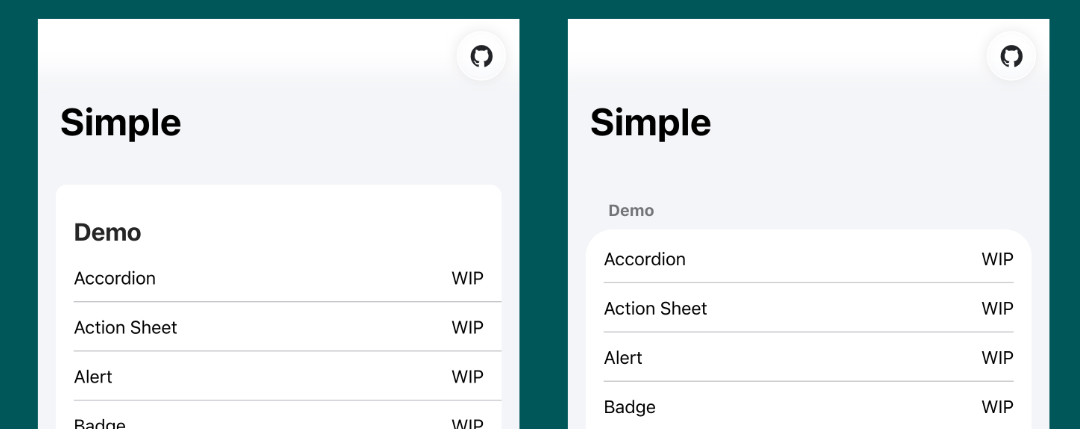
Solution: Background Color Separation
To faithfully reproduce iOS design, this theme makes the following changes:
- Set
ion-listbackground color to transparent - Delegate background color to
ion-item-group
This change allows ion-list-header to be treated as an independent element, achieving the native iOS appearance.
Using the Same Design with Material Design
If you want to use the same design pattern with Material Design theme, import the following CSS:
@import '@rdlabo/ionic-theme-ios26/dist/css/md-ion-list-inset.css';
This will apply the same ion-item-group pattern to the Material Design theme as well.
Summary
- Most cases: You can use your existing Ionic code as-is
- Specific conditions only:
ion-item-groupis only required when setting usinginsetonion-list - Purpose: To accurately reproduce iOS 26's native design patterns