
アニメーション
以下のgestureとanimation helperは実用段階(Stable)の任意機能です。これらを使わなくてもテーマは動作します。
ion-tab-button / ion-segment-button の Sheet of Glass
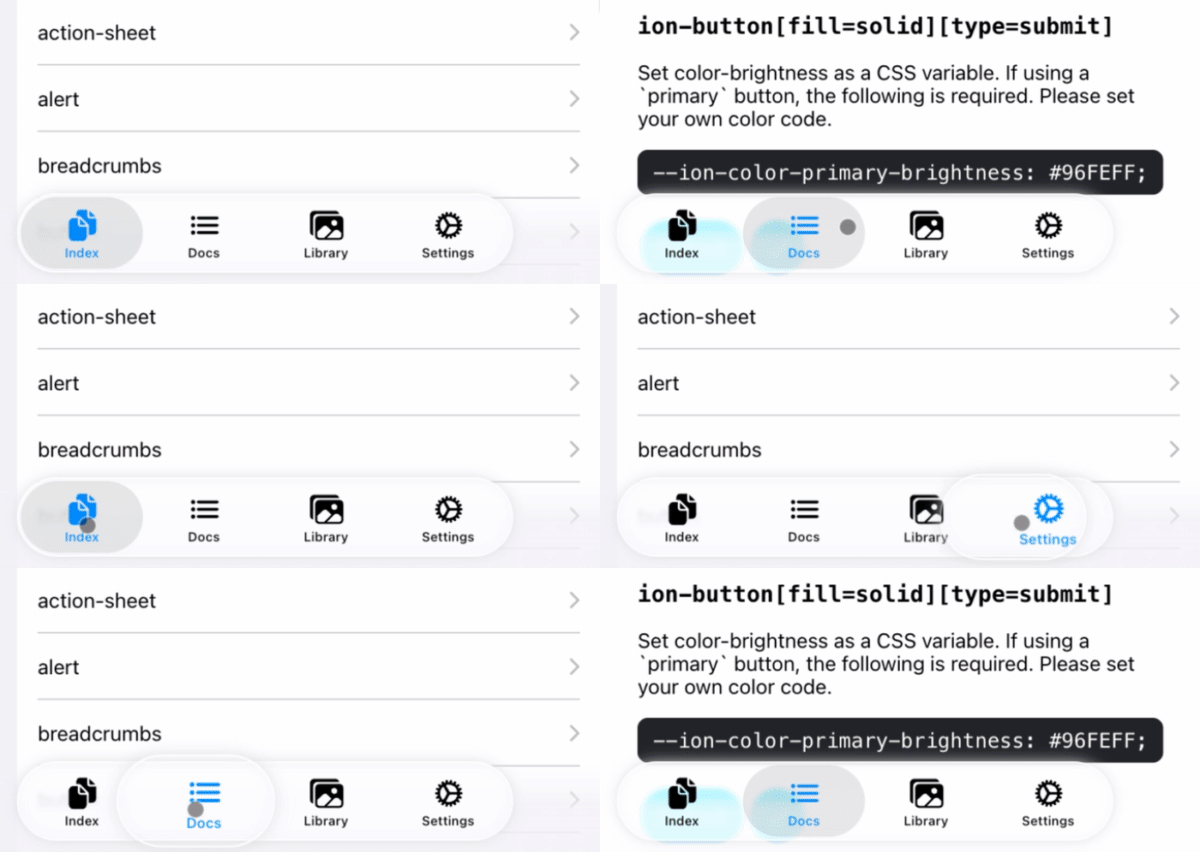
ion-tab-bar または ion-segment elementを登録すると、そのbuttonに移動するselection effectを追加できます。
registerTabBarEffect はページ表示中の変更も含め prefers-reduced-motion に従います。有効時は移動するレンズとタブの拡大を取り除き、Ionic標準の選択動作を維持します。無効に戻すと登録を破棄するまで効果が復帰します。
registerSegmentEffect は視覚効果だけを追加します。選択、ドラッグ、キーボード操作、イベントはIonicが管理します。未選択のsegmentは指を離した時にレンズが移動し、選択済みのsegmentは短いタップでもその場で拡大します。動きはiOS 27のpresentation layerの計測に基づきます。Reduce Motionでは効果を省略し、ネイティブglassの屈折はCSSで近似します。
import { registerTabBarEffect, registerSegmentEffect } from '@rdlabo/ionic-theme-ios27';

/**
 * 初期化済みのIonic DOM要素を登録します。
 */
const tabBar = document.querySelector<HTMLElement>('ion-tab-bar');
const segment = document.querySelector<HTMLElement>('ion-segment');
const registeredTabBarEffect = tabBar ? registerTabBarEffect(tabBar) : undefined;
const registeredSegmentEffect = segment ? registerSegmentEffect(segment) : undefined;

const destroy = () => {
  /**
   * If the registered DOM element is removed (e.g., due to page navigation),
   * make sure to destroy the gesture and animation. This will also remove the event listeners.
   * You can re-register them if needed.
   */
  registeredTabBarEffect?.destroy();
  registeredSegmentEffect?.destroy();
};
検索バーのキャンセルアイコン
Ionic 8と9はMaterial Design modeでのみ cancelButtonIcon を描画します。検索バーを登録すると、iOS modeでも同じプロパティを使えます。この任意のhelperなしでは、Ionicのキャンセル文字ボタンを維持します。
対応するIonicがiOS DOMへアイコンを描画するようになったら削除予定の一時的な描画補助です。既にアイコンがあれば挿入しません。キーボード、フォーカス、ボタンのアクセシビリティ属性、キャンセル・クリア動作はIonicが管理します。CSSのデザインとアニメーションはhelperから独立し、Ionic自身が描画するアイコンにも適用されます。
import { supportSeachbarCancelButtonIcon } from '@rdlabo/ionic-theme-ios27';
import { closeOutline } from 'ionicons/icons';

const searchbar = document.querySelector<HTMLIonSearchbarElement>('ion-searchbar')!;
searchbar.animated = true;
searchbar.showCancelButton = 'focus'; // 'always' と 'never' も利用できます
searchbar.cancelButtonIcon = closeOutline;
searchbar.clearIcon = closeOutline;
searchbar.cancelButtonText = 'Close search'; // アイコンボタンのアクセシブルな名前
const effect = supportSeachbarCancelButtonIcon(searchbar);

// JavaScriptプロパティでcancelButtonIconを変更したらeffect.refresh()を呼びます。
// コンポーネント・ページを破棄するとき:
// effect.destroy();
Ionic要素の初期化後(Angularなら ngAfterViewInit など)に登録します。Ionicのボタンとイベントハンドラを維持し、destroy() で文字表示に戻します。MD mode、searchbar-classic、ios-theme-disabled、ios26-disabled は対象外です。CSSアニメーションは animated と prefers-reduced-motion に従います。--background、--box-shadow、--border-radius、--cancel-button-color など標準のCSS変数も使えます。
クリアボタンも44pxのglassデザインで入力欄の横に表示します。Ionicの clearIcon、showClearButton、--clear-button-color を使います。クリアは入力フォーカスを維持し、キャンセルは検索を終了します。両方を同時表示でき、clearIcon と cancelButtonIcon を同じアイコンにすれば外観が揃います。
両ボタンの押下はiOS 27のキャンセルボタンと同じ中心からのspringを使い、8pxのpadding内で縁が切れないよう縮小します。通常44px、押下中57.2px、overshoot約58.26px(ネイティブは60px、peak61.29px)です。曲線はiPhone 18 Pro SimulatorのUIKit presentation layerの計測に基づき、Reduce Motionでは拡大しません。入力欄内の小さく拡大しないUIKitクリアボタンとは意図的に異なる共通デザインです。アイコンはIonicが供給するためSF Symbolsと画素単位では一致しません。
押下中はglass背景が不透明になり、アイコンは設定色のままopacityが0.55になります。--background-activated で押下背景を --background と別に設定できます。
TabBarSearchable: ion-tab-bar と ion-fab-button の Searchable
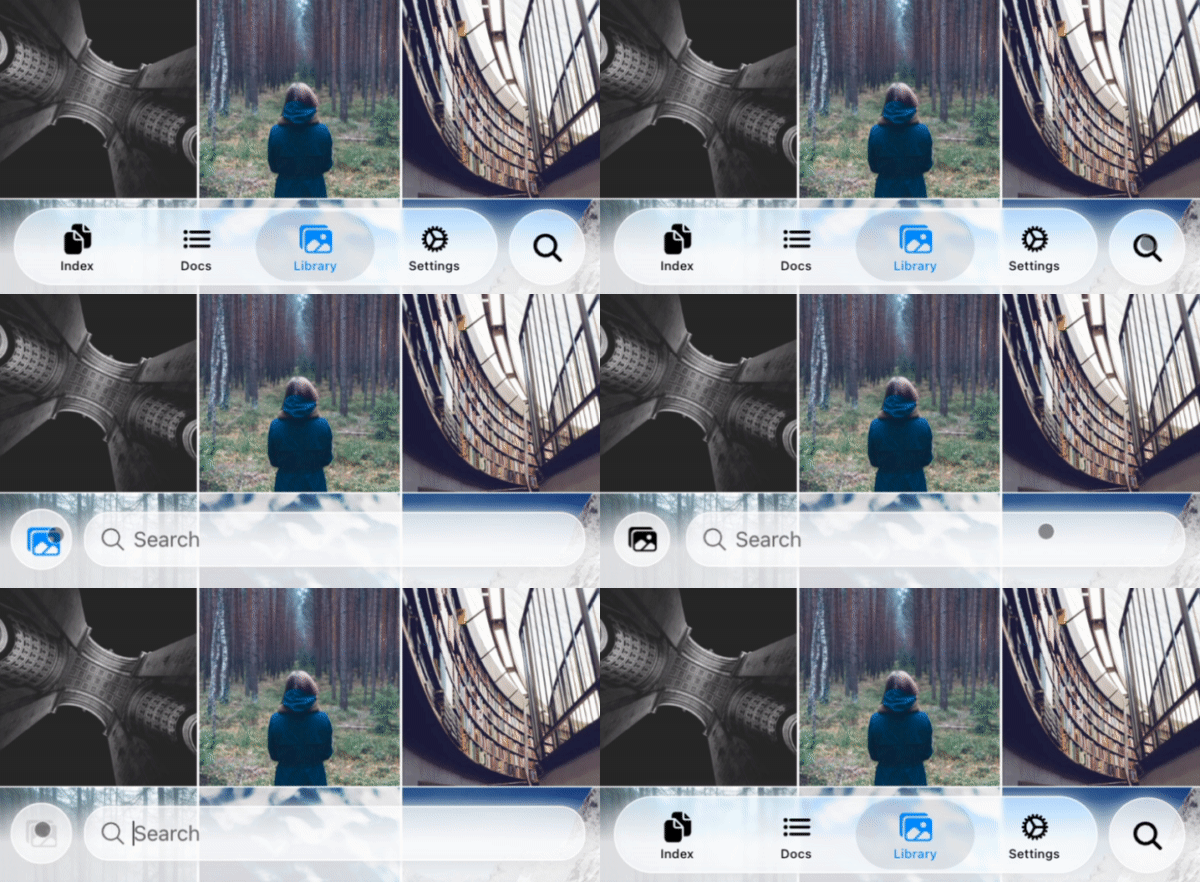
ion-tabs 内で次の構造を使うと、search buttonからsearch toolbarへのanimationを適用できます。
<ion-content>...</ion-content>
<ion-fab vertical="bottom" horizontal="end" slot="fixed">
  <ion-fab-button (click)="present($event)">
    <ion-icon name="search"></ion-icon>
  </ion-fab-button>
</ion-fab>
<ion-footer [translucent]="true">
  <ion-toolbar>
    <ion-buttons slot="start">
      <!-- ion-icon name is set dynamically by the animation -->
      <ion-button fill="default"><ion-icon slot="icon-only"></ion-icon> </ion-button>
    </ion-buttons>
    <!-- User set `ionChange` or other events. -->
    <ion-searchbar (ionChange)="example($event)"></ion-searchbar>
  </ion-toolbar>
</ion-footer>
import { attachTabBarSearchable, TabBarSearchableType } from '@rdlabo/ionic-theme-ios27';
import type { TabBarSearchableFunction } from '@rdlabo/ionic-theme-ios27';

let searchableFun: TabBarSearchableFunction | undefined;
const initialize = () => {
  // attachTabBarSearchable has state. You should initialize per page.
  const tabBar = document.querySelector<HTMLElement>('ion-tab-bar');
  const fabButton = document.querySelector<HTMLElement>('ion-fab-button');
  const footer = document.querySelector<HTMLElement>('ion-footer');
  if (!tabBar || !fabButton || !footer) {
    return;
  }
  searchableFun = attachTabBarSearchable(tabBar, fabButton, footer);
};

const present = (event: Event) => {
  searchableFun!(event, TabBarSearchableType.Enter);
};

const dismiss = (event: Event) => {
  searchableFun!(event, TabBarSearchableType.Leave);
};